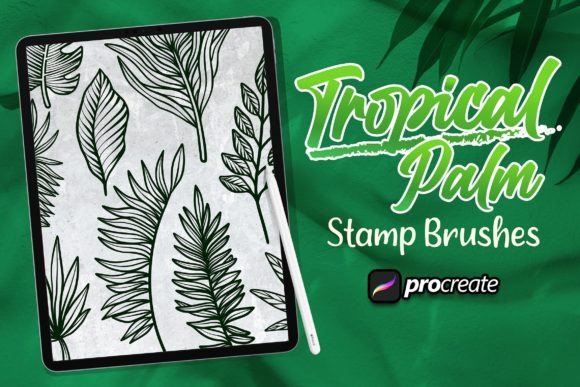
Mastering Digital Botanicals: A Practical Guide to the Tropical Palm Brush for Procreate
Digital illustration has evolved from simple line work into complex, textured compositions that rival traditional media. For artists working within the iPad ecosystem, finding the right tools to replicate organic forms is essential. The Tropical Palm Brush Procreate set addresses a specific niche in digital art: the creation of lush, detailed foliage without the tedious manual rendering of every leaf vein. This resource is designed to streamline the workflow for designers and illustrators who need high-quality botanical elements quickly.
In this package you will find everything you need - for example, making logos, illustrations, or special backgrounds. The value proposition lies not just in the aesthetic quality of the strokes, but in the versatility they offer across different design disciplines. Whether you are crafting a brand identity for a wellness company or adding depth to a character illustration, understanding how these brushes function can significantly impact your efficiency and final output.
Understanding the Mechanics of Specialized Foliage Brushes
Using a brush is very simple - just place the brush stamps and select the appropriate brush from the brush panel. However, beneath this simplicity lies a sophisticated arrangement of shape dynamics, scattering, and opacity settings. Unlike standard round brushes that require the artist to draw every contour, a specialized palm brush utilizes pre-designed shapes that react to pressure and tilt. This allows for natural variation in leaf size and orientation, which is critical for avoiding the "stamped" look that often plagues digital assets.
The distinction of the tropical palm brush lies in its attention to botanical accuracy. Generic leaf brushes often produce symmetrical, cartoonish shapes. In contrast, high-quality tropical sets include variations of monstera, fan palms, and fern-like structures that mimic the irregular growth patterns found in nature. This level of detail is crucial for professionals who need their work to withstand close inspection, such as in print media or high-resolution web graphics.
Comparative Analysis: Custom Brushes vs. Stock Assets
When deciding how to incorporate tropical elements into a project, artists generally choose between using custom brushes, importing stock vector assets, or drawing from scratch. Each approach has distinct tradeoffs regarding time, cost, and creative control.
- Stock Assets: Purchasing pre-made PNGs or vectors offers immediate results but limits customization. You cannot easily change the angle or density of leaves without distorting the image. Furthermore, overuse of popular stock packs can lead to generic-looking designs.
- Drawing from Scratch: This method provides total creative freedom but is time-intensive. Rendering realistic palm fronds requires a deep understanding of anatomy and lighting, which may not be feasible for tight deadlines.
- Tropical Palm Brush Procreate: This option strikes a balance. It offers the speed of stock assets with the flexibility of hand-drawn elements. You can layer strokes, adjust colors dynamically, and integrate the foliage seamlessly into your existing composition.
For professionals evaluating resources, the brush set serves as a middle ground. It reduces the technical barrier to entry for creating complex backgrounds while maintaining the artistic integrity of a hand-crafted piece. It is particularly effective for those who have strong compositional skills but wish to accelerate the texturing phase of their workflow.
Practical Applications and Use Cases
The versatility of this toolset extends beyond simple nature illustrations. Understanding where these brushes fit best can help users maximize their investment. Here are three primary scenarios where the tropical palm brush excels:
Brand Identity and Logo Design
Modern branding often incorporates organic elements to convey growth, sustainability, or relaxation. A coffee shop, spa, or eco-friendly product line might benefit from a logo featuring stylized palm leaves. Using a brush allows the designer to experiment with various arrangements rapidly. Unlike static vectors, brush strokes can be adjusted for weight and texture, enabling a more bespoke feel that aligns with artisanal brand values.
Editorial and Book Illustrations
Illustrators working on magazine spreads or book covers often need to fill negative space without distracting from the main subject. Tropical foliage provides an excellent framing device. The ability to layer semi-transparent leaves creates depth and atmosphere. By adjusting the opacity and blend modes, artists can push background elements back visually, ensuring the focal point remains clear while enriching the overall composition.
Pattern and Surface Design
Creating seamless patterns for textiles or wallpapers is another strong use case. The randomization features inherent in many advanced brush sets allow for the quick generation of non-repeating motifs. Designers can stamp various palm shapes, rotate them, and adjust scales to create a dense, jungle-like texture. This approach is significantly faster than manually placing individual elements in a grid.
Evaluating Limitations and Technical Considerations
While powerful, specialized brushes are not a universal solution. There are specific limitations that users must consider before integrating them into their pipeline. First, reliance on presets can stifle stylistic development if used exclusively. Artists should view these tools as aids rather than replacements for fundamental drawing skills. Overusing a single brush type can result in a homogeneous portfolio where all works share the same textual fingerprint.
Additionally, performance on older iPad models may vary. High-resolution brush tips with complex scattering algorithms can cause lag if the canvas size is too large or if too many layers are active. Users should optimize their workflow by merging layers periodically and keeping canvas dimensions appropriate for their intended output. For web-only projects, lower resolutions suffice, but print work demands higher fidelity, which may tax the device’s processor when using dense brush strokes.
Another consideration is color management. While the brushes provide shape and texture, the lighting and shading must still be applied manually or through additional layer effects. A common mistake among beginners is assuming the brush will handle all aspects of realism. In reality, the brush provides the structure; the artist must still apply knowledge of light sources and color theory to make the foliage appear three-dimensional and integrated into the scene.
Decision Factors: Is This Tool Right for You?
Choosing the right digital tools depends on your specific needs, skill level, and project requirements. The Tropical Palm Brush Procreate is an ideal choice if you frequently work on projects requiring organic textures and need to reduce production time. It is particularly beneficial for freelance illustrators who manage multiple clients and need to deliver high-quality work efficiently.
However, if your work focuses primarily on geometric abstraction, hard-surface modeling, or pixel art, this resource may offer limited utility. Similarly, artists who prefer a purely hand-drawn aesthetic with visible stroke imperfections might find the uniformity of brush stamps too clean. In such cases, combining these brushes with textured overlay layers or custom alpha locks can help break up the digital perfection.
When evaluating alternatives, consider the learning curve. While basic usage is straightforward, mastering the interplay between brush settings and layer modes takes practice. Users should be prepared to experiment with flow, jitter, and spacing to achieve unique results. Those unwilling to invest time in tweaking settings may find the default outputs sufficient for casual projects but limiting for professional-grade work.
Integrating Brushes into a Professional Workflow
To get the most out of this resource, integrate it into a broader toolkit. Do not rely on a single brush for all foliage needs. Combine the tropical palm strokes with simpler leaf shapes, grass textures, and solid color blocks. This layering approach creates visual interest and prevents the artwork from looking repetitive.
Furthermore, organize your brush library effectively. As you acquire more resources, keeping your panel clutter-free ensures you can access the right tool quickly. Group related brushes into folders labeled by function, such as "Background Foliage," "Foreground Details," or "Texture Accents." This organizational habit saves time during the creative process and reduces cognitive load.
Ultimately, the value of the tropical palm brush lies in its ability to enhance creativity rather than replace it. By handling the repetitive task of rendering complex leaf structures, it frees the artist to focus on composition, color harmony, and storytelling. For professionals seeking to expand their digital repertoire with efficient, high-quality botanical elements, this tool represents a practical and versatile addition to their arsenal.