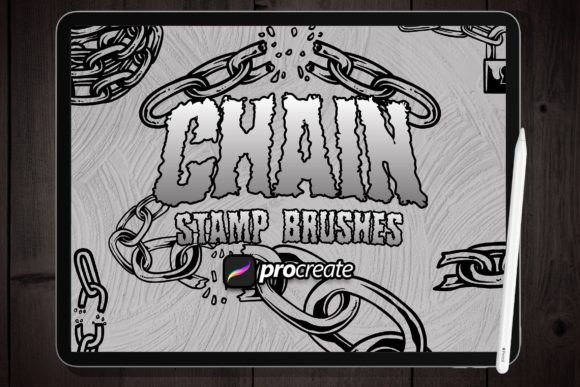
Mastering the Chain Stamp Brush in Procreate
Digital illustration has evolved from a niche hobby into a cornerstone of modern design, branding, and visual communication. For artists and designers working on iPads, Procreate remains the industry standard, offering an intuitive interface paired with powerful tools. Among the vast array of custom assets available, the Chain Stamp Brush stands out as a versatile utility that bridges the gap between traditional texture and digital precision. Whether you are crafting a rugged logo for a coffee shop or adding intricate details to a fantasy character’s armor, this specific brush type offers a streamlined workflow that saves time without sacrificing artistic integrity.
Understanding the Mechanics of Chain Stamping
To appreciate the value of a Chain Stamp Brush, it helps to understand how it differs from standard painting tools. Traditional brushes simulate media like watercolor, oil, or charcoal, relying on pressure sensitivity and tilt to vary opacity and shape. A stamp brush, however, places a pre-defined image or shape onto the canvas with each tap or stroke. The "chain" aspect refers to the spacing and continuity of these stamps. When you drag the stylus across the screen, the brush deposits the shape at regular intervals, creating a seamless or patterned line depending on the settings.
This package you will find everything you need – for example, making logos, illustrations, or special backgrounds. The beauty lies in its simplicity. Using a brush is very simple – just place the brush strokes and select the appropriate brush from the brush panel. This immediacy allows creators to focus on composition and layout rather than getting bogged down in repetitive manual drawing tasks. Instead of drawing every link of a chain individually, which can lead to inconsistencies in size and perspective, the brush ensures uniformity while allowing for organic placement.
Key Characteristics and Strengths
The primary strength of the Chain Stamp Brush Procreate asset is its efficiency. In professional environments, time is often as valuable as talent. A tool that reduces a ten-minute task to ten seconds provides a significant return on investment. Beyond speed, these brushes offer consistent aesthetics. When building brand identities, consistency is paramount. A hand-drawn chain might waver or change thickness unintentionally, but a stamp brush maintains the exact vector-like quality of the original design throughout the stroke.
- Uniformity: Every instance of the stamp is identical, ensuring a polished look.
- Scalability: Most stamp brushes retain clarity when resized, making them suitable for both small icons and large banners.
- Customizability: Users can adjust spacing, rotation, and size dynamics to fit specific project needs.
- Layer Flexibility: Stamps can be easily manipulated on separate layers, allowing for non-destructive editing.
Another notable quality is the texture integration. High-quality chain stamp brushes are not just flat black shapes; they often include subtle noise, grain, or shading that mimics real-world materials. This adds depth to digital artworks, preventing them from looking too sterile or computer-generated. For marketers and bloggers who need eye-catching visuals quickly, this built-in texture reduces the need for post-processing effects.
Practical Applications Across Industries
The versatility of the Chain Stamp Brush extends far beyond literal depictions of metal chains. Its utility spans various sectors, from commercial design to educational content creation.
Branding and Logo Design
Entrepreneurs and graphic designers frequently use chain motifs to symbolize strength, connection, or luxury. Jewelry brands, fitness companies, and industrial firms often incorporate chain elements into their logos. Using a stamp brush allows for rapid iteration. A designer can test multiple configurations—curved, straight, or circular—within minutes to see what best complements the typography. This agility is crucial during the brainstorming phase of brand development.
Illustration and Concept Art
For illustrators, particularly those working in fantasy or steampunk genres, accessories like belts, armor, and props are essential. Drawing these details manually can be tedious. The Chain Stamp Brush Procreate enables artists to block in complex structures quickly. Once the base shape is established, the artist can add highlights and shadows manually to integrate the stamp into the lighting of the scene. This hybrid approach combines the speed of automation with the nuance of hand-painting.
Digital Backgrounds and Patterns
Bloggers and web designers often require unique background textures. A chain pattern can create an industrial or edgy aesthetic for website headers, social media posts, or digital invitations. By adjusting the opacity and blending modes of the brush layer, creators can overlay chain patterns onto photos or solid colors to add visual interest without overwhelming the main content. This technique is particularly effective for event promotions, such as music festivals or urban fashion launches.
Enhancing Productivity and User Experience
Integrating specialized brushes like the chain stamp into your workflow enhances overall productivity. It reduces cognitive load by removing the need to solve repetitive structural problems manually. When the technical execution is simplified, mental energy is freed up for creative decision-making. For educators teaching digital art, these tools serve as excellent examples of how technology can augment traditional skills. They demonstrate that using aids is not "cheating" but rather a smart allocation of resources.
Moreover, the user experience within Procreate is enhanced by the tactile feedback of placing stamps. The immediate visual result provides satisfaction and momentum, encouraging further experimentation. This psychological boost can help overcome creative blocks, as the barrier to entry for creating complex designs is lowered.
Considerations for Effective Implementation
While the Chain Stamp Brush is powerful, it requires thoughtful application to avoid looking generic. Here are some practical considerations for selecting and using these tools:
- Contextual Fit: Ensure the style of the chain matches the overall aesthetic of your piece. A hyper-realistic metallic chain may clash with a flat, minimalist illustration. Look for brushes that offer varying levels of detail.
- Spacing Adjustments: Default spacing may not always work. Experiment with the brush settings to tighten or loosen the links. Too much space can break the illusion of connectivity, while too little can cause visual clutter.
- Color and Blending: Rarely should a stamp be used in pure black unless intended for high-contrast graphic design. Use color overlays, multiply modes, or manual painting to integrate the chain into the environment’s light source.
- Resolution Quality: Verify that the brush source image is high resolution. Low-resolution stamps will pixelate when scaled up, ruining the professional appearance of the final output.
When evaluating a brush pack, look for variety. A good package should include different angles, lengths, or styles of chains. This diversity prevents repetition in larger compositions. Additionally, check for compatibility with your version of Procreate to ensure smooth performance.
Final Thoughts on Digital Efficiency
The Chain Stamp Brush Procreate is more than just a shortcut; it is a strategic tool for modern creators. It empowers professionals to deliver high-quality work faster, allows hobbyists to achieve results that might otherwise seem technically out of reach, and provides marketers with the flexibility to produce on-brand visuals consistently. By understanding its mechanics and applying it with intention, you can elevate your digital artwork, streamline your workflow, and unlock new creative possibilities. As digital tools continue to advance, mastering these specialized assets will remain a key differentiator for efficient and impactful design.