Antler Procreate Stamps: Elevating Digital Illustrations with 15 Unique Deer Antler Designs
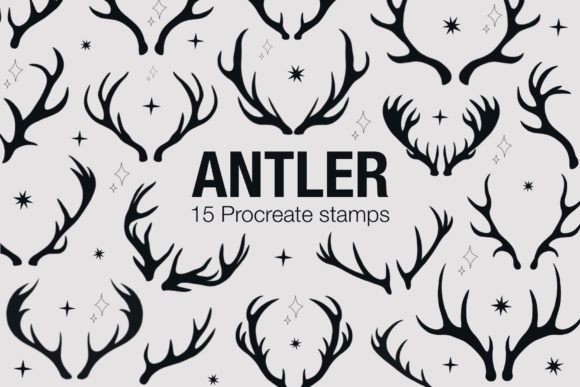
Digital art has evolved from a niche hobby into a robust professional tool, yet many artists still find themselves stuck in the repetitive cycle of drawing the same elements over and over. If you have ever spent twenty minutes perfecting the symmetry of a deer’s rack only to realize it doesn’t fit the composition, you understand the value of efficient resources. This is where Antler Procreate Stamps becomes an indispensable asset in your digital toolkit. This specialized brush set offers fifteen distinct deer antler designs, allowing you to bypass the tedious technical drawing phase and focus immediately on storytelling, composition, and mood.
These stamps are not just shortcuts; they are high-quality, pressure-sensitive assets designed to integrate seamlessly into your workflow. Whether you are illustrating a children’s book, designing rustic wedding invitations, or creating atmospheric concept art, having reliable, pre-drawn elements can significantly reduce burnout and increase output quality. The set includes a single .brushset file that installs directly into Procreate, requiring version 5.0 or higher, an iPad Pro or compatible iPad, and an Apple Pencil or pressure-sensitive stylus.
Why Specific Assets Matter in Professional Workflows
In the creative industry, time is often as valuable as talent. Clients do not always pay for the hours you spend sketching basic shapes; they pay for the final emotional impact of the piece. Using Antler Procreate Stamps allows you to reallocate your energy. Instead of worrying about the anatomical correctness of every tine and burr on an antler, you can concentrate on lighting, color grading, and background integration.
For freelancers and small business owners, this efficiency translates directly to profitability. If you can complete a commission in four hours instead of six because you utilized smart assets, your effective hourly rate increases. Moreover, consistency is key in branding. If you are creating a series of illustrations for a nature-focused brand, using a cohesive set of antler stamps ensures that every piece shares a unified visual language, reinforcing brand identity without extra effort.
Real-World Applications Across Industries
The versatility of these fifteen antler designs extends far beyond simple wildlife portraits. Here is how different creators can leverage this tool in their daily work:
Graphic Design and Branding
Designers working on logos or packaging for outdoor gear, craft breweries, or organic skincare lines often incorporate rustic motifs. Drawing antlers from scratch for every mockup is inefficient. With these stamps, you can quickly test various layouts. You might use a subtle, single-tine antler as a divider in a menu design or layer multiple stamps with reduced opacity to create a textured background for a product label. The ability to resize and rotate these vectors instantly allows for rapid prototyping during client presentations.
Wedding and Event Stationery
The "rustic chic" aesthetic remains popular in wedding invitations, save-the-dates, and table numbers. Couples often request personalized touches that include natural elements. By using Antler Procreate Stamps, stationery designers can offer custom illustrations without charging prohibitive fees. You can combine the antlers with floral brushes or hand-lettered names to create elegant, bespoke headers. Since the stamps are high-resolution, they print cleanly on textured cardstock, maintaining professionalism in physical deliverables.
Educational Content and Publishing
Educators and self-publishers creating materials about wildlife, biology, or forest ecosystems need accurate yet engaging visuals. Textbooks and worksheets often require clear diagrams. While scientific accuracy is paramount, these stamps provide a solid base that can be annotated. A teacher could import an antler stamp into Procreate, then use the annotation tools to label parts of the rack, explaining growth cycles to students. For children’s book authors, these stamps serve as excellent underlays. You can trace over them to add fur texture or cartoonish features, speeding up the character design process for woodland creatures.
Social Media and Marketing
Content creators need a steady stream of visually appealing posts. During autumn or hunting season, lifestyle bloggers and marketers can use these antlers to frame quotes, highlight sales, or create thematic story backgrounds. Because the stamps are easy to manipulate, you can change their color to match your brand palette—perhaps turning them gold for a luxury feel or deep brown for an earthy vibe. This adaptability keeps your feed fresh without requiring new photography sessions.
Technical Considerations and Best Practices
Before downloading and installing Antler Procreate Stamps, it is important to understand how to get the most out of them. These are not static images; they are dynamic brushes that respond to your input. To use them effectively, you must have an iPad that supports pressure sensitivity. Without an Apple Pencil or a compatible stylus, you will lose the nuance that makes digital art feel organic.
When you first open the brush set, experiment with the pressure settings. Some stamps may appear heavier or lighter depending on how hard you press. This feature is crucial for achieving depth. For example, pressing lightly might create a faint, distant antler silhouette, while pressing firmly creates a bold, foreground element. Layering these variations adds dimension to your work.
Additionally, consider the resolution of your canvas. While Procreate handles large files well, starting with a sufficiently high DPI (dots per inch) ensures that when you scale these stamps up for print projects, they remain crisp. If you plan to use these for large-format prints like posters or banners, start your document at least at 300 DPI at the final print size.
Enhancing Creativity Through Constraint
It might seem counterintuitive, but limiting your tools can boost creativity. By having a curated set of fifteen antler styles, you are freed from the paralysis of infinite choice. You are not scrolling through thousands of generic clip-art options; you are working with a cohesive collection designed by an artist who understands form and flow. This constraint encourages you to think differently about how to modify and integrate these elements.
Try combining the antler stamps with other textures. Use the blending modes in Procreate—such as Multiply, Overlay, or Screen—to merge the antlers with paper textures, watercolor washes, or photographic backgrounds. You can also use the clipping mask feature to paint colors or patterns strictly within the shape of the antler. This technique allows for endless customization, ensuring that no two uses of the stamp look identical.
Who Benefits Most from This Tool?
This resource is ideal for intermediate to advanced Procreate users who already understand the basics of layers and blending but want to speed up their workflow. It is also excellent for beginners who struggle with drawing complex organic shapes. If you find yourself intimidated by the anatomy of deer, these stamps provide a safe, professional-looking foundation that you can build upon. Entrepreneurs selling digital goods can even use these stamps as components in larger kits, provided they adhere to the licensing terms, adding value to their own product offerings.
Ultimately, Antler Procreate Stamps is about removing friction from the creative process. It acknowledges that while skill is essential, efficiency is sustainable. By integrating these fifteen carefully crafted designs into your library, you equip yourself to handle diverse projects with confidence and speed. Whether you are designing a logo, illustrating a story, or teaching a class, these tools help you communicate your vision more clearly and effectively.
Remember, the goal of any digital asset is to serve your artistic intent, not replace it. Use these stamps as a starting point, a structural guide, or a decorative accent. Let them handle the heavy lifting of structure so you can focus on the soul of your artwork. With the right device and a bit of experimentation, you will find that these small additions make a significant difference in the quality and consistency of your digital portfolio.