Enhancing Winter Digital Art with Snowflakes Brush Stamps for Procreate
Digital illustration offers unparalleled flexibility, yet certain repetitive elements can slow down even the most experienced artists. Among these, intricate geometric patterns like snowflakes present a unique challenge. While drawing a single crystal by hand is a rewarding exercise in symmetry and precision, populating a winter scene with dozens of unique variations can become tedious. This is where specialized tools like Snowflakes Brush Stamps Procreate enter the workflow, offering a streamlined solution for iPad users who value both efficiency and aesthetic consistency.
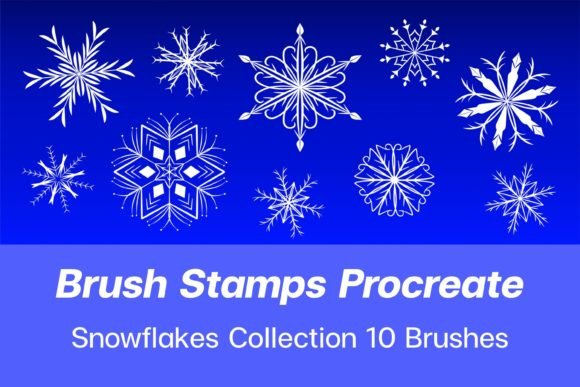
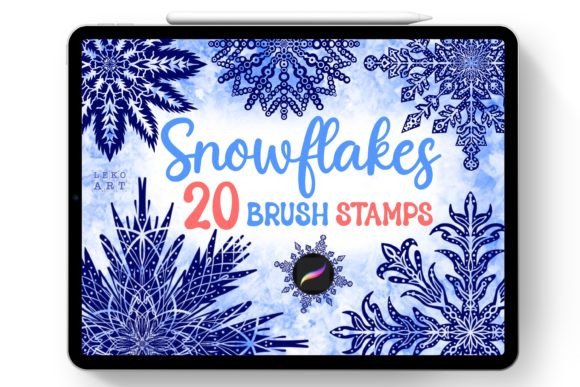
This set includes twenty distinct snowflake designs, carefully crafted to integrate seamlessly into the Procreate ecosystem. Unlike generic shape tools or manual drawing methods, these stamps provide immediate texture and detail, allowing artists to focus on composition and lighting rather than repetitive line work. However, understanding when to use such assets—and recognizing their limitations—is crucial for maintaining artistic integrity and technical compatibility.
Understanding the Tool and Its Specific Constraints
Before integrating any new asset into your digital toolkit, it is essential to understand its technical boundaries. The Snowflakes Brush Stamps Procreate package is distributed as a single .brushset file contained within a zip archive. This format is native to Procreate, meaning the installation process is designed to be frictionless for iPad users. Upon downloading and opening the file on an iPad, the operating system recognizes the extension and automatically imports the brushes into the application. There is no need for complex folder management or manual configuration; the set appears ready for use immediately.
However, this convenience comes with a strict limitation: compatibility. These brushes are engineered exclusively for the Procreate engine on iPadOS. They will not function in other painting programs such as Photoshop, Clip Studio Paint, Krita, or Procreate Pocket on iPhone. For artists who maintain a cross-platform workflow, this is a significant consideration. If you frequently switch between desktop and tablet environments, relying solely on platform-specific brush sets can create fragmentation in your library. In such cases, using standard PNG stamp images might offer greater versatility, albeit with less integration ease.
Comparing Stamp Brushes to Manual Drawing and Shape Tools
When deciding whether to adopt a pre-made brush set, it helps to compare it against the primary alternatives: manual drawing and vector-based shape tools. Each approach has distinct tradeoffs regarding time investment, customization, and visual outcome.
- Manual Drawing: Creating snowflakes by hand allows for total creative control. You can adjust arm length, branch complexity, and imperfection levels to suit a specific narrative style. However, achieving perfect radial symmetry requires skill and time. For background elements or distant details, this level of effort may yield diminishing returns.
- Vector Shape Tools: Some digital art software offers geometric shape generators. These are mathematically perfect but often lack the organic, hand-drawn feel that characterizes compelling illustration. They can appear sterile or too uniform, requiring additional texturing to blend into a painted environment.
- Stamp Brushes: The Snowflakes Brush Stamps Procreate set bridges the gap between speed and aesthetic quality. The twenty included designs vary in complexity, offering options for both subtle background dust and prominent foreground features. Because they are brush stamps, they retain the pressure sensitivity and tilt recognition inherent to Procreate, allowing for dynamic sizing and opacity changes that static stickers cannot match.
The key distinction lies in intent. If the snowflake is the focal point of the piece, manual drawing may still be preferable to ensure unique character. However, for atmospheric effects, holiday cards, or patterned backgrounds, stamp brushes provide a professional finish with a fraction of the time investment.
Evaluating Best-Use Cases and Limitations
Not every project benefits from the use of stamp brushes. Understanding the right context ensures these tools enhance rather than hinder your creative process.
Ideal Scenarios for Use
These brushes excel in projects requiring repetition and variation. Consider a holiday greeting card design where snow needs to fall across the entire canvas. Using twenty different stamps prevents the "cloning" effect, where identical shapes repeat visibly, breaking the viewer's immersion. Similarly, in concept art for winter landscapes, these stamps can quickly establish mood and weather conditions without distracting from the main subject.
They are also valuable for educators and content creators who need to produce visuals quickly. For tutorial thumbnails or social media graphics, the ability to generate crisp, clean snowflake elements instantly can significantly streamline production schedules.
Potential Limitations
While versatile, stamp brushes have inherent constraints. Since there are only twenty variations in this set, extensive use in a single large-scale piece may lead to noticeable repetition if not managed carefully. Artists should consider rotating, flipping, and resizing the stamps to maximize variety. Additionally, because these are raster-based brushes, scaling them up excessively beyond their original resolution may result in pixelation. It is advisable to test the largest required size early in the process to ensure clarity.
Another limitation is stylistic rigidity. The snowflakes in this set have a specific design language—likely clean, symmetrical, and decorative. If your artwork employs a rough, sketchy, or highly abstract style, these polished stamps may clash visually. In such cases, customizing the brush settings or overlaying texture masks might be necessary to integrate them harmoniously.
Integration into Your Digital Workflow
Integrating Snowflakes Brush Stamps Procreate into your existing workflow requires minimal adjustment but offers opportunities for optimization. Once imported, the brushes reside in your brush library. To maintain organization, consider creating a dedicated group for seasonal or environmental assets. This prevents clutter and makes it easier to locate specific tools during intense creative sessions.
For best results, experiment with layer blending modes. Snowflakes often look more natural when set to Screen or Add mode, especially against darker backgrounds, as this mimics the way light interacts with ice crystals. Adjusting opacity can further enhance depth, allowing distant flakes to fade subtly into the atmosphere while foreground elements remain crisp and bright.
It is also worth noting the importance of staying updated. Digital art tools evolve rapidly, and creators often release new designs or updates to existing sets. Subscribing to the creator’s updates ensures you do not miss new designs that could complement your current library. This ongoing support can be invaluable for artists looking to expand their resource pool without starting from scratch each time.
Making an Informed Decision
Choosing whether to invest time in learning and using Snowflakes Brush Stamps Procreate depends on your specific artistic needs and technical environment. If you are an iPad-only Procreate user who frequently creates winter-themed art, holiday designs, or atmospheric backgrounds, this tool offers a high return on investment in terms of time saved and visual quality. The ease of installation and immediate usability lowers the barrier to entry, making it accessible even for beginners.
Conversely, if you work across multiple platforms, require highly customized geometric structures, or prefer a completely hand-drawn aesthetic for all elements, this set may not align with your workflow. In those instances, exploring vector tools or developing personal brush libraries might be more beneficial.
Ultimately, digital art resources should serve your creativity, not constrain it. By understanding the strengths, limitations, and ideal applications of tools like these snowflake stamps, you can make informed decisions that enhance your productivity while preserving the unique voice of your artwork. Whether used sparingly for accent or extensively for pattern, these brushes represent a practical addition to the modern digital illustrator’s toolkit, provided they are used within their intended ecosystem.