Mastering Digital Florals: A Deep Dive into the Two Color Flower Brush
In the expansive world of digital illustration, efficiency is often just as valuable as raw talent. For artists, designers, and content creators, the ability to render complex organic shapes quickly can mean the difference between a project that feels laborious and one that flows naturally. This is where specialized tools like the Two Color Flower Brush come into play. Rather than relying on standard round brushes to painstakingly build petals layer by layer, this specific tool offers a streamlined approach to creating vibrant, dual-toned floral elements.
Whether you are a professional graphic designer working on branding materials, a hobbyist illustrator filling a sketchbook, or a social media creator looking for unique decorative elements, understanding how to leverage this brush can significantly enhance your workflow. This article explores the mechanics, applications, and practical considerations of using a two-color flower brush in your digital art toolkit.
Understanding the Mechanics of Dual-Tone Design
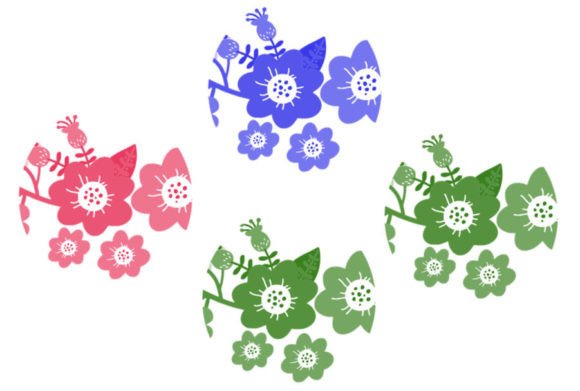
At its core, the Two Color Flower Brush is designed to simplify the rendering of depth and dimension. In traditional painting, achieving a realistic or stylized flower often requires mixing paints to create highlights and shadows manually. In digital art, this usually involves multiple layers and careful opacity adjustments. However, this brush automates part of that process by embedding two distinct color values into a single stamp or stroke.
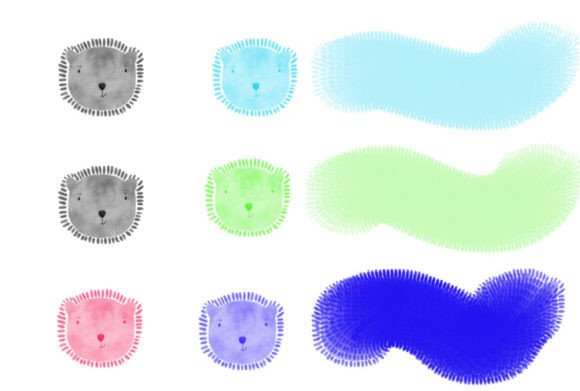
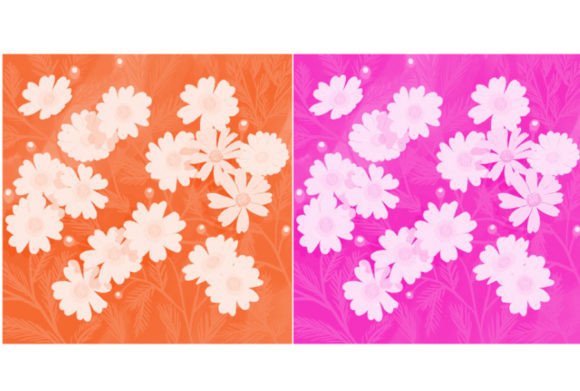
When you apply the brush, it typically lays down a base color while simultaneously introducing a secondary tone. This secondary tone might act as a shadow, a highlight, or a contrasting accent, depending on the brush’s configuration. The result is an immediate sense of volume and texture that would otherwise take several minutes to achieve manually. This feature is particularly useful for creators who need to populate a scene with foliage or floral patterns without sacrificing the overall cohesion of the piece.
What’s Included in This Brush Set
Before diving into techniques, it is essential to understand what you are actually acquiring when you download this tool. Transparency regarding file types and contents helps ensure compatibility with your preferred software. Here is exactly what you can expect:
- The ZIP File: The download comes compressed in a standard ZIP archive, ensuring safe and quick transfer.
- File Formats: Inside, you will find files in either
.brushes(commonly used for Procreate) or.swatches(often used for Photoshop or other Adobe products), ensuring broad compatibility across major digital art platforms. - Quantity: This specific set includes 1 Brush. While it may seem minimal, this single tool is engineered for versatility, allowing for varied results through pressure sensitivity and angle adjustments.
Practical Applications Across Industries
The utility of the Two Color Flower Brush extends far beyond simple doodles. Its application varies significantly depending on the user’s profession and end goals. Let’s examine how different creators can integrate this tool into their daily workflows.
- Graphic Design and Branding: Designers often need to create intricate borders, backgrounds, or logos that feature botanical elements. Using a standard brush can lead to inconsistent shapes, making the design look amateurish. The two-color brush provides uniformity while maintaining an organic feel, perfect for wedding invitations, packaging designs, or boutique branding.
- Digital Illustration and Concept Art: For illustrators working on fantasy scenes or character backgrounds, time is a critical resource. Painting every leaf and petal individually is impractical. This brush allows for rapid "blocking in" of floral environments, which can then be refined with finer details later.
- Social Media Content Creation: Influencers and content managers frequently need eye-catching graphics for stories, posts, and headers. The immediate visual appeal of a dual-tone flower adds a professional polish to Canva templates or Instagram overlays without requiring advanced drawing skills.
Evaluating Suitability: Is This Tool Right for You?
While the benefits are clear, it is important to approach any digital asset with a critical eye. Not every project requires a specialized brush, and understanding its limitations is key to effective use.
Strengths and Advantages
The primary strength of the Two Color Flower Brush is speed. It reduces the number of steps required to create a finished-looking element. Additionally, because the color interaction is pre-programmed, it helps maintain color harmony throughout a piece. If you struggle with color theory or selecting complementary shades, this brush acts as a safeguard, ensuring that your highlights and shadows always align aesthetically.
Considerations and Limitations
However, reliance on preset brushes can sometimes lead to a "cookie-cutter" appearance if not managed carefully. Since the set includes only 1 Brush, repetition is a risk. If you use the same stamp repeatedly without varying size, rotation, or opacity, your artwork may look static and artificial. Furthermore, the fixed two-color nature means you have less control over the specific gradient transition compared to manual blending. Users must be willing to experiment with layer modes and additional coloring to break up the uniformity.
Real-World Scenarios and Best Practices
To get the most out of this tool, consider these practical scenarios and tips for integration:
Scenario 1: The Quick Greeting Card
Imagine you need to design a last-minute birthday card. Instead of searching for stock images that may not fit your color scheme, you can use the Two Color Flower Brush to create a custom border. By varying the pressure on your stylus, you can create flowers of different sizes and intensities, adding a personal touch that stock assets lack.
Scenario 2: Pattern Design
For textile or wallpaper designers, creating seamless patterns is a common task. Use the brush to scatter floral elements across a canvas. Because the brush includes two colors, you can easily recolor the layer to test different palettes. Remember to rotate the brush stamp randomly to avoid visible repeating grids, which can ruin the illusion of a natural pattern.
Tips for Natural-Looking Results
- Vary Your Pressure: Don’t just click; drag and vary your pen pressure to change the opacity and size of the flower dynamically.
- Layering is Key: Use the brush on multiple layers. Place darker, smaller flowers in the background and larger, brighter ones in the foreground to create depth.
- Combine with Other Tools: Use the Two Color Flower Brush for the main shapes, but switch to a standard soft brush to add subtle glows or hard brushes for fine stamen details. This hybrid approach prevents the artwork from looking too digital or rigid.
- Experiment with Blend Modes: Try setting the brush layer to "Multiply" for a watercolor effect or "Overlay" for a vibrant, glowing look. This simple tweak can drastically change the mood of the piece.
Final Thoughts on Enhancing Your Digital Toolkit
Incorporating specialized tools like the Two Color Flower Brush is not about replacing skill, but rather about augmenting your creative capacity. It allows you to focus more on composition, storytelling, and overall design rather than getting bogged down in the repetitive mechanics of painting individual petals.
For general consumers and professionals alike, the value lies in the balance between convenience and customization. By understanding what is included in the ZIP file—specifically the single, versatile brush—and recognizing its strengths and limitations, you can make an informed decision about its place in your workflow. Whether you are crafting a professional brand identity or simply enjoying the therapeutic process of digital painting, this tool offers a straightforward path to beautiful, organic results.
Ultimately, the best way to determine if this brush suits your needs is to experiment. Download the file, install the .brushes or .swatches, and start creating. You may find that this small addition to your library opens up new avenues for creativity and efficiency in your digital art journey.